We have all had this problem. You are trying to download a driver or read an article. The page is so cluttered with flashing Ad banners and auto-play ads that it takes a long time to load. This is really annoying it is a waste of bandwidth. It is a security risk. For a time if you wanted to block these ads for every device in your house or office you had to set up a separate DNS Sinkhole like Pi-hole or AdGuard Home in a container or, on a Raspberry Pi.
The big moment came with the release of MikroTik RouterOS 7.15. MikroTik quietly added a native AdList feature directly into the DNS settings of MikroTik RouterOS 7.15. This means you can now block millions of ad domains on your MikroTik router regardless of its CPU architecture without ever touching a container or external hardware.
Watch the full walkthrough on the Net Admin HUB YouTube channel:
Why Move Away from Pi-hole?
Don’t get me wrong, Pi-hole is great. But it requires specific hardware or a router that supports containers (ARM or x86). If you have an older MikroTik or a smaller device like a hAP Lite, you were out of luck—until now.
The native AdList feature uses “null-routing.” When a device on your network asks for the IP of an ad server, the MikroTik simply returns 0.0.0.0. The ad never loads, the browser moves on, and your network stays clean.
Step 1: Prepare Your Router (The Cache Trap)
Before you start importing massive lists of 70,000+ domains, you need to fix one default setting. By default, MikroTik’s DNS cache is usually set to a tiny 2MB. If you try to import a big list now, you’ll see an “exceeded max cache entries” error in your logs.
- Go to IP > DNS.
- Increase the Cache Size to something substantial, like 20.00 MiB (depending on your RAM).
- Click Apply and then Cache > Flush Cache to start fresh.
Step 2: Importing a Ad List (URL Method)
The easiest way to get started is by using a community-maintained list. The Steven Blacklist is a gold standard here.
- In Terminal:
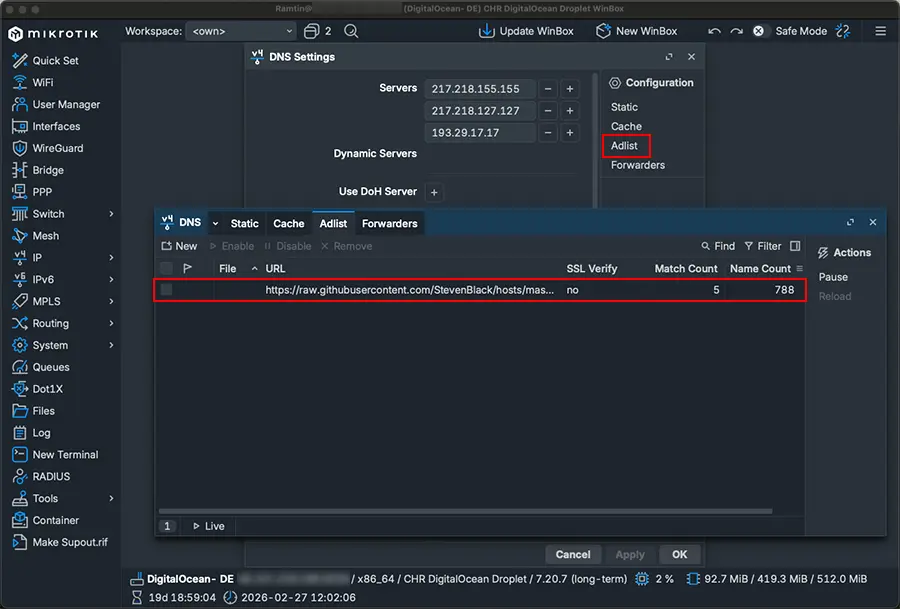
/ip dns adlist add url=https://raw.githubusercontent.com/StevenBlack/hosts/master/hosts ssl-verify=no - In WinBox: Navigate to IP > DNS > Adlist, click Add, paste the URL, and uncheck SSL Verify.
Once added, you’ll see the “Match Count” start to climb almost immediately as devices on your network try to reach out to known trackers.
Step 3: Creating Your Own “Blacklist” (File Method)
Sometimes you find a specific local ad domain that isn’t on the global lists. You can create your own .txt file for this.
- Create the file: Go to Files and create a file named
my-ads.txt. - Format: Inside the file, use the format:
0.0.0.0 domain.com. - Import: In the AdList menu, add a new entry but select File instead of URL and point it to your
.txtfile.
Step 4: The Exception (Whitelisting)
What if the AdList blocks a site you actually need? Since you can’t edit a URL-based list, you have to create a “Forward” record.
- Go to IP > DNS > Static.
- Add a new entry.
- Name: The domain you want to unblock.
- Type: Forward.
- Forward To:
8.8.8.8(or your preferred DNS).
This tells the router: “Even if this is in the AdList, bypass it and ask Google instead.”
Quick Setup Summary
| Feature | Action / Requirement | Benefit |
| Minimum Version | RouterOS 7.15+ | Native support on all CPUs. |
| DNS Cache | Increase to 200MB+ | Prevents import errors. |
| Import Method | URL (e.g., Steven Black) | Automatic updates every 4 hours. |
| Custom Rules | Local .txt File | Block specific/local domains. |
| Whitelisting | Static DNS “Forward” | Fixes “broken” websites easily. |
| Troubleshooting | “Pause” Button | Temporarily disable blocking. |
Frequently Asked Questions
1. Which MikroTik routers support the AdList feature?
Any MikroTik router capable of running RouterOS version 7.15 or later supports AdList. Unlike the older container-based methods (which required ARM or x86 CPUs), this native feature works on all architectures, including older MIPSBE and MMIPS devices.
2. Will this slow down my internet connection?
Actually, it usually makes browsing feel faster. Because the router blocks the ad requests at the DNS level, your devices don’t waste time or bandwidth downloading heavy image and video banners. The CPU impact on the router is minimal as long as you have enough RAM for the DNS cache.
3. How often does the AdList update?
If you use the URL method (like the Steven Blacklist), MikroTik automatically checks for updates every 4 hours. You don’t need to manually reload the list unless you’ve just made a change and want to see it reflected immediately.
4. Why are some ads still showing up on YouTube or Facebook?
This is a common limitation of DNS-based blocking. Platforms like YouTube and Facebook often serve ads from the same domains as their actual content. If you block those domains, you’ll block the entire service. For these “first-party” ads, you would still need a browser extension like uBlock Origin.
5. I added the list, but I still see ads on my computer. Why?
There are usually two culprits:
- DNS Cache: Your computer or browser might have the old ad IP addresses cached. Try flushing your computer’s DNS (e.g.,
ipconfig /flushdnson Windows). - Hardcoded DNS: Some devices or browsers (using “DNS over HTTPS”) might be bypassing your MikroTik. Ensure your devices are set to use the router as their only DNS server.
6. Can I use multiple lists at the same time?
Yes! You can add multiple URLs and multiple local files. MikroTik will aggregate all of them. Just remember to monitor your RAM usage and increase your DNS Cache size accordingly to accommodate the total number of domains.
Final Thoughts
The MikroTik AdList feature is a tool that you can set up and then not have to think about it. This tool makes a difference in how users experience things. The MikroTik AdList feature is faster than using something that is based on containers. The MikroTik AdList feature even works on old or cheap MikroTik hardware.
Have you tried using the MikroTik AdList feature of the Pi-hole?. Did you have some problems, with how big the cache was when you tried to use the MikroTik AdList feature? We can talk about the MikroTik AdList feature in the comments.